4.1.2 Artificial Neural Network (ANN)

Fig. 4.4 ANN Widget
Run Artificial Neural Network (ANN) analysis.
4.1.2.1 Usage
- Add a vector file with the landslide inventory. You can either type the absolute path to thefile or select it from your PC with a dialog (4).
Add (7) raster datasets to the explanatory parameters (5)
Set the type (6) of each parameter using the combobox
(Optional) Adjust the calculation settings in the advanced settings (1)
Provide an output name (9)
Start the calculation (10)
Remove raster datasets from the calculation by clicking (8).
After the calculation finished you can view the results (2).
Support for automatically writing a report (3) is coming soon.
4.1.2.2 Advanced Settings
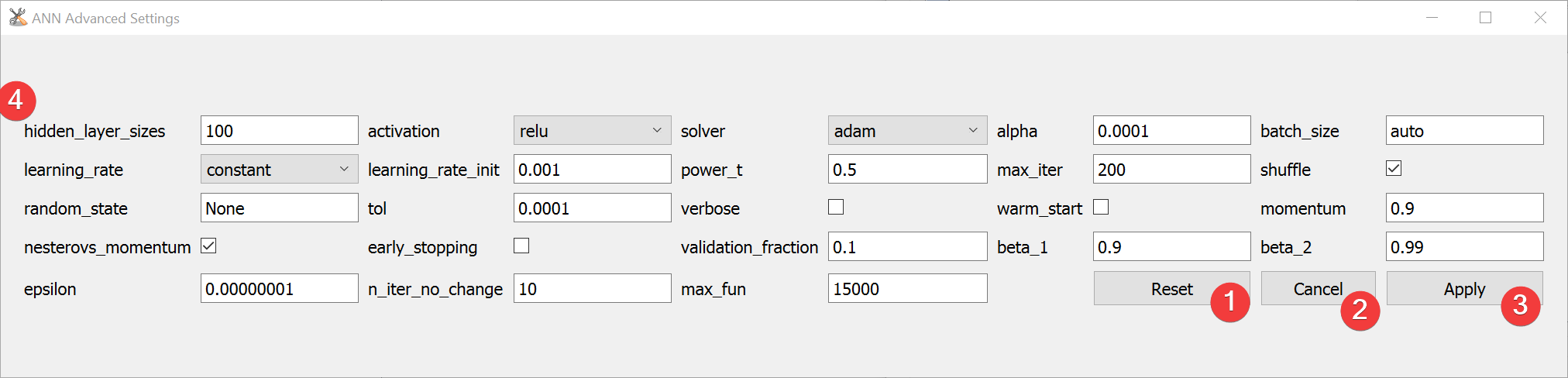
Fig. 4.5 ANN Advanced Settings Widget
To learn more about the individual parameters (4) see scikit-learns MLPClassifier documentation
After changing the values you can reset (1) them to default values or apply (3) them.
Close and cancel (2) at any time without making changes to the Settings.
Edit the defaults by changing [DEFAULT] in *LSAT Folder*/core/widgets/ANN/ann_config.ini.
4.1.2.3 Information
LSAT PM uses scikit-learns MLPClassifier to apply ANN to spatial data.
Changes made to the settings are persistent.
4.1.2.4 Input and Output
Input |
Raster dataset(s) (.tif) Feature dataset (Vector file) |
Output |
ANN model raster dataset (.tif) Output path: /results/ANN/rasters/*output name*_ann.tif ANN model information (.npz) Output path: /results/ANN/tables/*output name*_tab.npz ANN model (.pkl) Output path: /results/ANN/tables/*output name*_model.pkl |
