3.4.3 Euclidean distance
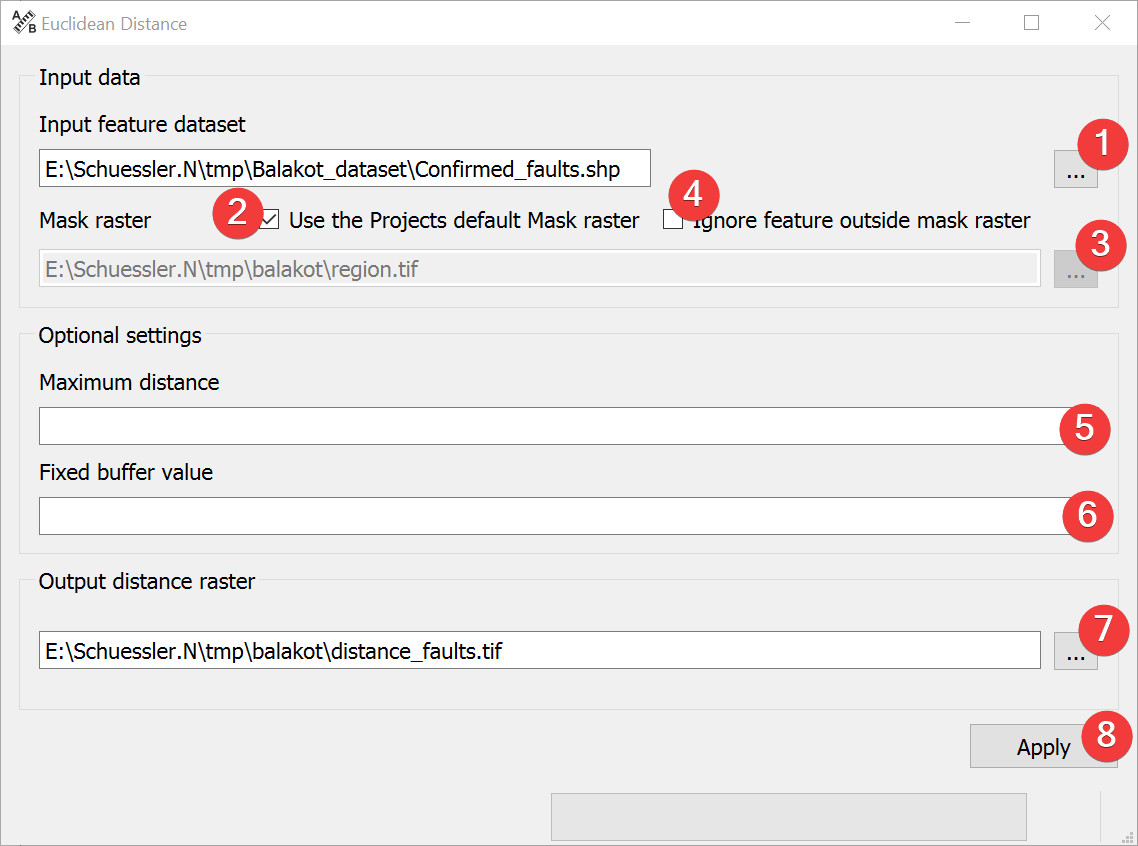
Fig. 3.18 Euclidean Distance Widget
This widget estimates the closest Euclidean distance of a raster cell to the feature dataset.
3.4.3.1 Usage
- Select the input feature file. You can either type in the absolute file path or select itfrom your PC (1).
If necessary change the mask raster by unchecking (2) and selecting a new one (3).
(Optional) Choose to ignore (4) parts of the input feature that are not inside the mask.
(Optional) Set the maximum distance to calculate the distance (5).
(Optional) Set the value to write into cells within the distance (6).
- Select the output distance raster location. You can either type in the absolute file pathyourself or pick one with a dialog (7).
Start the calculation (8)
If the input feature dataset lies at least partially outside the mask and these parts are not ignored LSAT extents the output raster while keeping the mask raster cell size.
If you want to use the output raster in your LSAT Project you need to import it using the Import Raster Widget.
3.4.3.2 Input and Output
Input |
Feature dataset to calculate the distance from Mask raster dataset (.tif) |
Output |
Euclidean distance raster dataset (.tif) |